IBM Guardium 11.5 End of Support: The 2026 Upgrade Guide to 12.2
Guardium 11.5 left base support on 30 April 2026, and 12.0 followed on 30 September. Dates, the 11.5 to 12.2 upgrade path, and what blocks it.

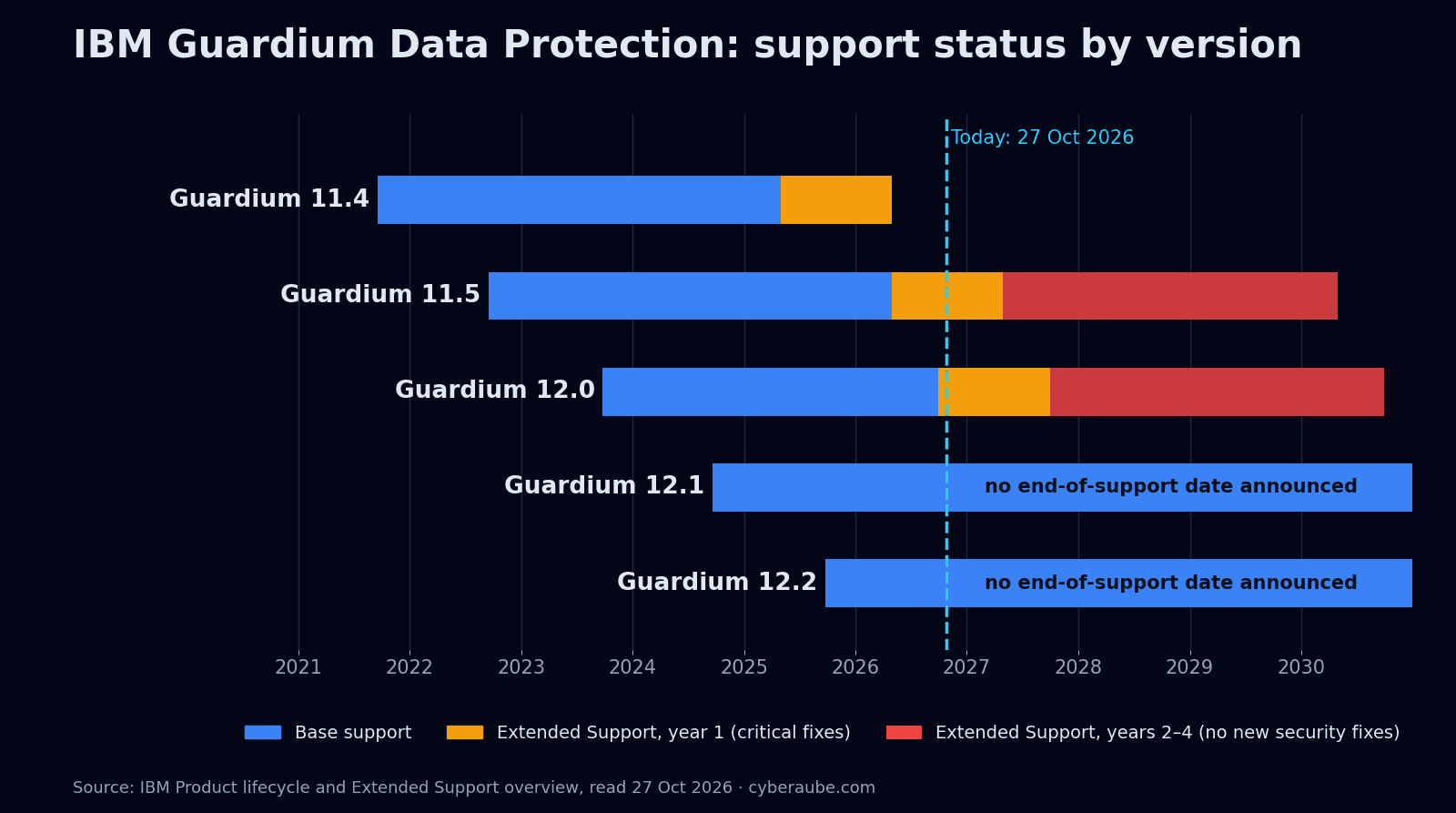
If your Guardium estate still runs 11.5, it has been on Extended Support since 30 April 2026, and from May 2027 it stops receiving new security fixes. The upgrade most teams planned, to 12.0, no longer solves the problem either: 12.0 left base support on 30 September 2026.
Executive Summary
IBM's Product lifecycle site now shows two Guardium Data Protection versions in Extended Support. Guardium 11.5 (GA 16 September 2022) transitioned on 30 April 2026; Guardium 12.0 (GA 26 September 2023) followed on 30 September 2026. Their Extended Support completes on 30 April 2030 and 30 September 2030 respectively. Guardium 11.4 is gone entirely: its Extended Support completed on 30 April 2026.
Those long tail dates are misleading. Under IBM's Extended Support terms, only the first year includes critical defect fixes, and years two to four carry no new security fixes. For an 11.5 estate, that first year ends on 30 April 2027.
The good news is that IBM now ships a direct route. Upgrade patch 11.0p12002 takes an 11.5 appliance straight to 12.2 (GPU 12.0p200), skipping 12.0. The bad news is that a meaningful share of real-world appliances cannot take it in place: custom partitions, cloud-hosted appliances and old M5 hardware all force a rebuild.
This post sets out the dates, the two upgrade paths, the conditions that decide which one you are on, and a sequence for doing it without opening a gap in your database audit trail.
1. Where Each Guardium Version Stands
All dates below are from IBM's Product lifecycle site, read on 27 October 2026.
| Version | General availability | Base support ended | Extended Support completes | Status today |
|---|---|---|---|---|
| 11.4.x | 17 Sep 2021 | 30 Apr 2025 | 30 Apr 2026 | Out of support |
| 11.5.x | 16 Sep 2022 | 30 Apr 2026 | 30 Apr 2030 | Extended Support |
| 12.0.x | 26 Sep 2023 | 30 Sep 2026 | 30 Sep 2030 | Extended Support |
| 12.1.x | 19 Sep 2024 | — | — | Supported |
| 12.2.x | 23 Sep 2025 | — | — | Supported (current) |
Two smaller items in the same lifecycle listing are worth checking if they apply to you: Guardium Data Protection for NAS 11.5.x, 12.0.x and 12.1.x all show support ending on 30 December 2026, and several first-generation appliance part numbers are listed as withdrawn.
What Extended Support actually buys
IBM positions Extended Support as transition time for moving to a newer version of the same product, for up to four additional years. It requires active Subscription and Support, and you arrange it through your IBM representative.
| Year 1 | Years 2–4 | |
|---|---|---|
| How-to and troubleshooting support | Yes | Yes |
| Access to existing patches and fixes | Yes | Yes |
| New critical defect fixes | Yes | No |
| New security fixes | Critical defects only | No |
| Enhancements | No | No |
For 11.5, year one runs to 30 April 2027. For 12.0, to 30 September 2027. After those dates, a newly disclosed vulnerability in the appliance stack will not get an IBM fix on that version.
2. Why 12.2 Is the Target, Not 12.0
Until mid-2026, the standard advice for an 11.5 estate was "go to 12.0". The upgrade patch for that, 11.0p12001, still exists and replaces the earlier 11.0p12000. But 12.0 has now joined 11.5 in Extended Support, so an 11.5 → 12.0 project today buys roughly eleven months of full support before you have to do it again.
IBM's 11.0p12002 patch removes that problem by upgrading 11.5 directly to 12.2 (GPU 12.0p200). From there, 12.2 maintenance releases are ordinary GPU patches: 12.2.2 is GPU 12.0p220 and 12.2.3 is GPU 12.0p230, both installable from 12.2.0.
What 12.2.x brings that matters operationally:
- Automated patch downloads from the CLI (12.2.3), which needs internet access directly or through a proxy.
- Active threat analytics updates, including automatic case closure, generative AI explanations of policy violations, and coverage for Db2 for z/OS.
- Long-term retention (data lake) support and NFS targets for archiving.
- External AI provider integrations and Model Context Protocol (MCP) server support, both configurable and both worth a governance review before you switch them on.
- Universal connector updates (Logstash 9.3.3 in 12.2.3). Note that universal connector support for EDB Postgres over Kafka and Yugabyte over Kafka is discontinued as of 12.2.3, so check whether you rely on either before you go that far.
3. In-Place Upgrade or Rebuild: What Decides It
There are two ways to get from 11.5 to 12.2.
In place, with 11.0p12002. You patch the running appliance. Prerequisites, per IBM's release notes:
- Appliance bundle 11.0p580 or later already installed (for the 12.0 route via 11.0p12001, the floor is 11.0p525).
- The latest pre-upgrade health check, 11.0p9998 (released 7 August 2026).
- Appliance firmware at the vendor's latest version.
Rebuild and restore. You take a full system backup, install 12.2 from the ISO on the same or new hardware, and restore the backup. It is slower and needs more planning, but it is the only route for some configurations.
The health check is what tells you which one you are on. It fails the in-place route for:
- Custom or non-standard partitions, including a missing
/boot,/or/var, multi-disk installs, or other custom partition flags. In IBM's community forum, an engineer hitting the message "FOR UPGRADE TO v12 APPLIANCE SHOULD BE REBUILT" was told this is a deliberate block, not a bug, and that LVM-based layouts (disks showing as/dev/mapper/...) fall into the same category. - Cloud-hosted appliances on AWS, Azure, IBM Cloud, Google Cloud or Oracle Cloud.
- GPU level below 11.0p500, which means anything still on 11.4 or earlier must reach 11.5 first.
It also checks, and will warn or fail on, a list of things that commonly derail upgrades in long-running estates:
- Database usage above 80% (error) or
/varabove 45% (warning), plus space on/bootand/varfor the upgrade backup. - An active swap partition (required).
- Old hardware: M4 fails, M5 warns.
- S-TAP agents at 10.5 or earlier, and GIM clients still using SHA1 certificates.
- TLS 1.2 availability, backup server SSH host-key algorithms, CLI password expiry, crashed MySQL tables and duplicate aliases.
Run it from the Central Manager: it checks rebuild requirements across the managed units as well, so one run tells you how many appliances will need the longer route.
Things the 11.0p12002 release notes tell you to check first
- Backup storage. For the upgrade, S3 and Tivoli Storage Manager are supported targets; IBM COS, NFS and EMC are not. The health check also accepts SCP and SFTP for 12.2 system backups.
- External password vaults. The upgrade is not supported if appliance passwords are stored externally in CyberArk, HashiCorp Vault or AWS Secrets Manager.
- TLS. Keep TLS 1.2 enabled until every add-on and feature in your environment supports TLS 1.3.
- CLI settings. Several CLI settings, including
store timeout db_connectionandstore system sshd-max-connection, do not persist through the upgrade. Record them beforehand and re-run them after. - Port 8586. Close TCP 8586 if you do not use Guardium Data Security Center.
If you take the 12.0 route with 11.0p12001 instead, note two items from its release notes: the /var partition loses 25 GB after the upgrade, and CAS certificates are not preserved.
4. Hardware: Can Your Appliances Run 12.2?
IBM's Guardium hardware appliance lifecycle page is blunt about the older generations:
| Appliance generation | Hardware end of support | Guardium versions listed |
|---|---|---|
| M5 (Lenovo M5, e.g. X2264, X3164) | 30 Apr 2025 (passed) | 10.0 to 11.4 only |
| M6 (Lenovo M6, e.g. X2364, X3264) | 28 Feb 2029 | 10.0 to 12.1 |
| M7 (Lenovo M7, e.g. X2464, X3364) | Not yet listed | 11.5, 12.0, 12.1, 12.2 |
| M7 "N" models (X3364N) | Not yet listed | 12.0 and 12.2 |
M5 owners cannot reach 12.x on that hardware at all; this is a hardware refresh or a move to virtual appliances, and a rebuild either way. M6 owners should confirm 12.2 support with IBM before committing to a date, because the lifecycle page lists M6 only up to 12.1.
Virtual appliances avoid the hardware question but not the partition one: a VM built years ago with a custom disk layout will still fail the health check.
5. Upgrading Without a Gap in the Audit Trail
The appliance restarts during every patch installation, and IBM's notes say plainly to schedule upgrades in batches during low database traffic to limit audit gaps, and never to reboot while a patch is installing. For a regulated estate, "limit" is not good enough; you want to show an auditor there was no unmonitored window.
A sequence that works:
- Inventory first. List every Central Manager, aggregator and collector with its version, GPU and bundle level, hardware generation or VM spec, partition layout and backup target. List S-TAP and GIM versions per database server.
- Run 11.0p9998 from the Central Manager. Split the estate into in-place and rebuild appliances. Fix the warnings that can be fixed in place: disk usage, swap, S-TAP ≤10.5, GIM SHA1 certificates, backup target and protocol.
- Bring every appliance to bundle 11.0p580 or later and current firmware.
- Upgrade top down. Central Manager first, then aggregators, then collectors. If the Central Manager itself needs a rebuild, plan for managed units losing their connection to it; IBM has a dedicated technote on rebuilding a CM while keeping managed units connected.
- Protect the audit stream on each collector. Before a collector goes down, make sure every S-TAP pointing at it has a working failover collector configured, and verify the traffic actually moved. Upgrade collectors in small batches, never all the collectors that back the same databases at once.
- After each appliance: apply the latest quarterly Database Protection Service (DPS) update, then the latest Rapid Response DPS update; re-run the CLI settings you recorded; if GIM clients disconnect with port 8446 open, restart the GUI service from the CLI (
restart gui). - Then the agents. Update GIM clients (including IBM's SHA256 certificate technote) and S-TAPs, again in batches.
- Prove it. For every monitored database, show continuous audit records across the upgrade window, and confirm that archived audit data from before the upgrade can still be restored and read.
Test the whole sequence on a non-production Central Manager and collector pair first. The rebuild route in particular is not something to learn on production.
6. What This Means for Indian Regulated Entities
Guardium usually sits in an Indian estate because a regulator expects database activity monitoring, which makes the support status of the platform an audit question, not just an IT one.
SEBI CSCRF. Database activity monitoring is mandatory for Market Infrastructure Institutions and qualified REs under SEBI's framework, with audit data recoverable to a 15-minute RPO (see our SEBI CSCRF checklist). A DAM platform that can no longer receive security fixes is a hard finding to defend when the control it implements is itself mandatory.
CERT-In remediation windows. CERT-In's May 2026 blueprint sets indicative remediation windows from 12 hours to five days by risk tier (we covered it in CERT-In's 12-Hour Patch Window). On 11.5 after April 2027, or 12.0 after September 2027, a new vulnerability in the appliance stack has no vendor patch to apply, so every finding falls into the blueprint's "no patch available" row and needs compensating controls for as long as you stay on that version.
CERT-In log retention. The April 2022 CERT-In Directions require logs to be retained for 180 days within Indian jurisdiction. Plan the archive and restore checks in step 8 above with that window in mind: the upgrade must not strand audit data you are obliged to produce.
DPDP Act. Guardium is often part of how a Data Fiduciary evidences reasonable security safeguards for personal data. The same logic applies: a safeguard on an unsupported platform is a weaker safeguard.
7. A Realistic Timeline
For a typical Indian enterprise estate of one Central Manager, two aggregators and six to ten collectors:
| Phase | Duration | What happens |
|---|---|---|
| Assessment | 1–2 weeks | Inventory, health check from the CM, in-place vs rebuild split, hardware check, backup target fixes |
| Preparation | 1–2 weeks | Bundles to 11.0p580+, firmware, S-TAP failover configuration, change approvals, non-production test |
| Appliance upgrade | 2–4 weeks | CM, aggregators, then collectors in batches; rebuilds take longer |
| Agents and validation | 1–2 weeks | GIM and S-TAP updates, DPS updates, audit continuity evidence |
Estates with M5 hardware, cloud-hosted appliances or many custom-partitioned VMs should expect the appliance phase to run longer, because each of those is a rebuild. Working back from 30 April 2027, an 11.5 estate that has not started should be in assessment this quarter.
Talk to a Team That Has Run Guardium Upgrades
Cyberaube implements, upgrades and runs IBM Guardium for Indian enterprises, and places Guardium engineers into client teams on contract and permanent terms. If you are scoping an 11.5 or 12.0 upgrade, or have hit the "should be rebuilt" message and need a plan, we can help you get to 12.2 without a gap in your audit trail.
Talk to a Cyberaube Guardium specialist
FAQ
When did IBM Guardium 11.5 reach end of support?
Guardium Data Protection 11.5 moved from base support to Extended Support on 30 April 2026. IBM's Product lifecycle site lists 30 April 2030 as the date Extended Support completes. Guardium 11.4 is fully out of support; its Extended Support completed on 30 April 2026.
Is Guardium 12.0 still supported?
Guardium 12.0 moved from base support to Extended Support on 30 September 2026, with Extended Support completing on 30 September 2030. Guardium 12.1 (GA 19 September 2024) and 12.2 (GA 23 September 2025) have no end-of-support date listed yet, so 12.2 is the sensible target for an upgrade from 11.5.
What does IBM Extended Support cover?
IBM describes Extended Support as up to four additional years of transition time. It includes how-to and troubleshooting support and access to existing fixes, and critical defect fixes in the first year only. In years two to four IBM provides no new security fixes. It requires active Subscription and Support and is arranged through your IBM representative.
Can I upgrade Guardium 11.5 directly to 12.2?
Yes, on supported configurations. IBM's upgrade patch 11.0p12002 takes an appliance from 11.5 to 12.2 (GPU 12.0p200). It requires appliance bundle 11.0p580 or later, the pre-upgrade health check patch 11.0p9998, and current vendor firmware. The older patch 11.0p12001 upgrades 11.5 to 12.0, which is itself now out of base support.
When does a Guardium upgrade need a rebuild instead of an in-place patch?
The 11.0p9998 health check blocks in-place upgrades for appliances with custom or non-standard partitions and for appliances running on AWS, Azure, IBM Cloud, Google Cloud or Oracle Cloud. Those are upgraded with the rebuild-and-restore method, which means backing up the appliance, installing the new version from the ISO and restoring the backup.
Will my Guardium appliance hardware run 12.2?
IBM's hardware lifecycle page lists M5 appliances for versions up to 11.4 only, with hardware support ended on 30 April 2025, so they cannot run 12.x. M6 appliances are listed up to 12.1, with hardware support until 28 February 2029. M7 appliances are listed for 11.5 through 12.2. Check M6 plans for 12.2 with IBM before you commit to dates.
In what order should Guardium appliances be upgraded?
Top down. Upgrade the Central Manager first, then aggregators, then collectors, and then bring GIM clients and S-TAPs up to date. Run the 11.0p9998 health check from the Central Manager first, because it also checks the managed units.
Conclusion
The headline date, 30 April 2026, has already passed, and for most teams it changed nothing visible: the appliances kept running and the dashboards stayed green. The date that changes things is the end of the first Extended Support year, when new security fixes stop: 30 April 2027 for 11.5 and 30 September 2027 for 12.0.
The upgrade itself is well defined now. 11.0p12002 goes straight to 12.2, the health check tells you in one run which appliances can take it, and the rest is sequencing. What takes time is the part the patch cannot do for you: finding out which of your appliances were built with custom partitions years ago, which collectors have no failover, and which hardware has quietly aged out. Start there.
About the Author
Saurabh Pande is Co-Founder and Director of Cyberaube Technologies. He spent more than ten years working on IBM Security products, including Guardium, QRadar, ECM and Security Verify, and is an IBM Guardium subject-matter expert.
About Cyberaube
Cyberaube provides cybersecurity staffing, 24/7 managed security services and implementation for SIEM, IAM and data protection platforms, including IBM Guardium, Imperva, QRadar, Splunk, CyberArk and Okta, for enterprises in India and globally. See our professional services, managed support and Guardium implementation roadmap.
Contact Cyberaube about your Guardium upgrade
Sources
- IBM Product lifecycle, Guardium Data Protection (viewed 27 October 2026)
- IBM, Extended Support overview
- IBM, Release of Guardium Data Protection upgrade patch 11.0p12002
- IBM, Release of Guardium Data Protection patch 11.0p12001
- IBM, Pre-upgrade health check 11.0p9998
- IBM, Release of Guardium Data Protection 12.2, 12.2.2 and 12.2.3
- IBM, Guardium hardware appliance support lifecycle
- IBM, Upgrading a CM with the rebuild and restore method
- IBM Community, Update Guardium v11.5 to 12.x error and Upgrade from 11.4 to 11.5 then 12.0